MixUp and CutMix Augmentation Tutorial¤
| Metadata | Value |
|---|---|
| Level | Intermediate |
| Runtime | ~20 min |
| Prerequisites | Operators Tutorial, Augmentation basics |
| Format | Python + Jupyter |
Overview¤
MixUp and CutMix are powerful batch-level augmentation techniques that mix pairs of samples to create virtual training examples. Unlike element-level augmentations (rotation, brightness, noise), these require access to multiple samples simultaneously and produce soft labels for improved model calibration.
What You'll Learn¤
- Understand MixUp and CutMix augmentation techniques and their mathematical formulations
- Use
BatchMixOperatorfor both MixUp and CutMix modes - Understand soft label generation for mixed samples
- Tune the alpha parameter to control mixing strength
- Visualize mixed samples and label distributions
- Compare MixUp vs CutMix trade-offs for different use cases
Coming from PyTorch?¤
If you're familiar with PyTorch augmentations, here's how Datarax batch mixing compares:
| PyTorch (timm) | Datarax |
|---|---|
Mixup(mixup_alpha=0.4) |
BatchMixOperator(mode="mixup", alpha=0.4) |
CutMix(cutmix_alpha=1.0) |
BatchMixOperator(mode="cutmix", alpha=1.0) |
| Applied in training loop | Applied as pipeline operator |
| Manual soft label handling | Automatic label mixing |
mix_batch(images, labels) |
apply_batch(batch) with RNG |
Key difference: Datarax integrates mixing into the pipeline DAG with explicit RNG management.
Coming from TensorFlow?¤
| TensorFlow | Datarax |
|---|---|
tf.image.random_crop + blend |
BatchMixOperator(mode="cutmix") |
| Manual lambda sampling | Automatic Beta distribution sampling |
| Batch-level tf.function | apply_batch() with JAX JIT |
Files¤
- Python Script:
examples/advanced/augmentation/01_mixup_cutmix_tutorial.py - Jupyter Notebook:
examples/advanced/augmentation/01_mixup_cutmix_tutorial.ipynb
Quick Start¤
# Run the Python script
python examples/advanced/augmentation/01_mixup_cutmix_tutorial.py

# Or launch the Jupyter notebook
jupyter lab examples/advanced/augmentation/01_mixup_cutmix_tutorial.ipynb
Background: Batch-Level Augmentation¤
Why MixUp and CutMix?¤
Standard augmentations (rotation, brightness, noise) operate on individual samples. MixUp and CutMix operate on pairs of samples, creating "virtual" training examples that don't exist in the original dataset.
Benefits: - Improved model calibration (better confidence estimates) - Better generalization to out-of-distribution data - Regularization through label smoothing - Robustness to adversarial examples
Element-Level vs Batch-Level¤
| Aspect | Element-Level | Batch-Level |
|---|---|---|
| Scope | Single sample | Sample pairs |
| Labels | Unchanged | Mixed (soft labels) |
| Examples | Rotation, Noise, Brightness | MixUp, CutMix |
| Implementation | apply() with vmap |
apply_batch() on full batch |
| Dependencies | None | Requires batch access |
MixUp Formula¤
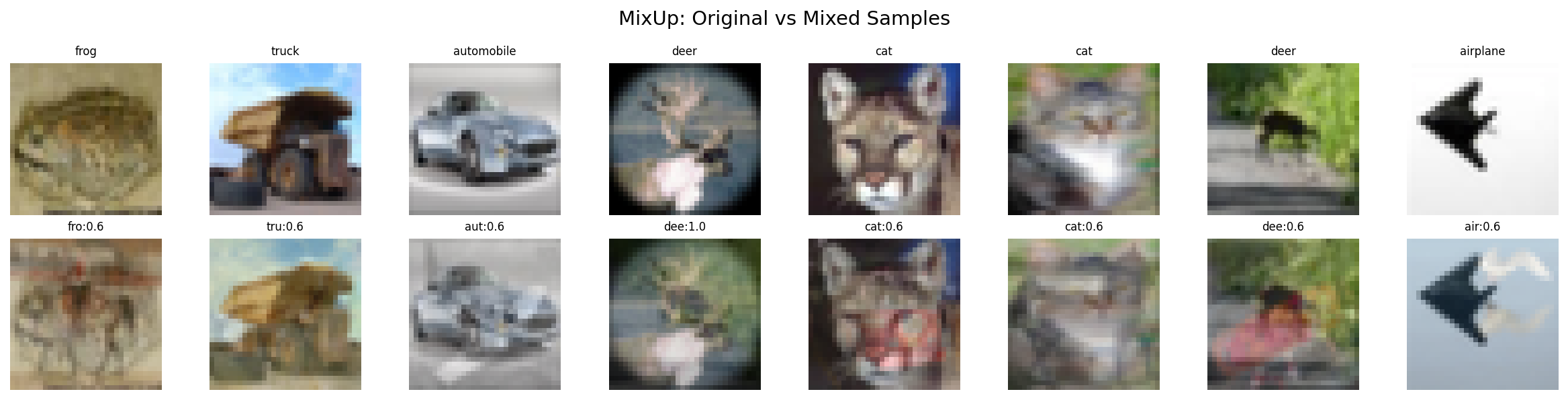
MixUp creates linear interpolations between pairs of samples:
Visual effect: Ghostly overlap of two images
CutMix Formula¤
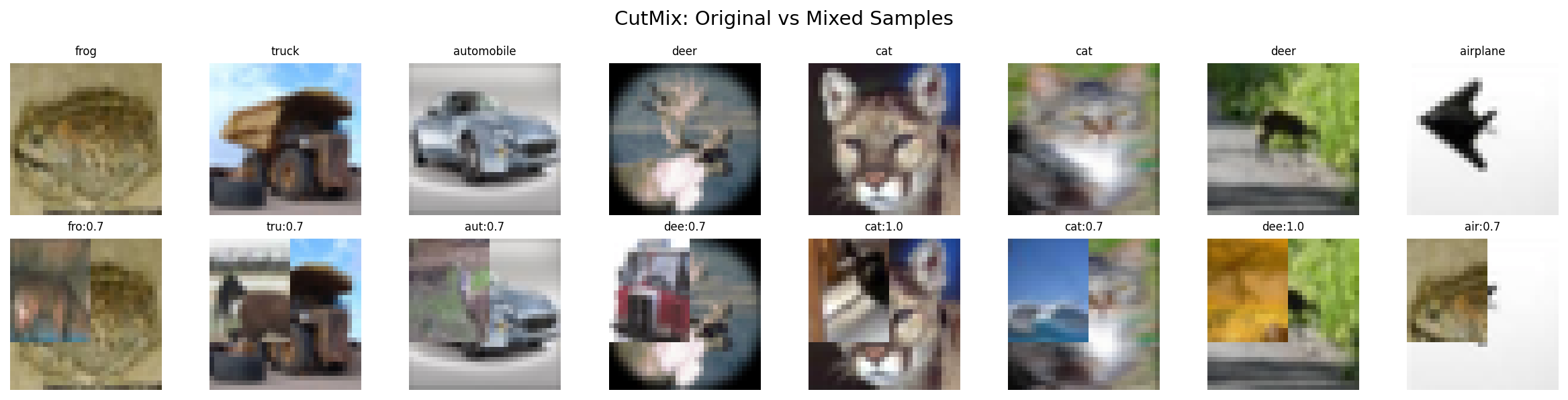
CutMix cuts a rectangular patch from one image and pastes it onto another:
x_mixed = M ⊙ x_a + (1 - M) ⊙ x_b
y_mixed = (1 - area_ratio) * y_a + area_ratio * y_b

where M is a binary mask and area_ratio ~ Beta(α, α)
Visual effect: Sharp boundary between two images
Setup¤
# GPU Memory Configuration
import os
os.environ["CUDA_VISIBLE_DEVICES_FOR_TF"] = ""
os.environ["TF_CPP_MIN_LOG_LEVEL"] = "3"

import tensorflow as tf
tf.config.set_visible_devices([], "GPU")

# Core imports
from pathlib import Path
import jax.numpy as jnp
import matplotlib.pyplot as plt
import numpy as np
from flax import nnx

# Datarax imports
from datarax.pipeline import Pipeline
from datarax.core.config import BatchMixOperatorConfig
from datarax.operators import ElementOperator, ElementOperatorConfig
from datarax.operators.batch_mix_operator import BatchMixOperator
from datarax.sources import TFDSEagerConfig, TFDSEagerSource
Part 1: Load CIFAR-10 Data¤
We'll use CIFAR-10 because it's more complex than MNIST and benefits more from batch augmentation.
# CIFAR-10 constants
CIFAR10_MEAN = jnp.array([0.4914, 0.4822, 0.4465])
CIFAR10_STD = jnp.array([0.2470, 0.2435, 0.2616])
CIFAR10_CLASSES = [
    "airplane", "automobile", "bird", "cat", "deer",
    "dog", "frog", "horse", "ship", "truck"
]

BATCH_SIZE = 32
NUM_CLASSES = 10

def preprocess_cifar10(element, key=None):
    """Preprocess CIFAR-10 with one-hot labels for mixing."""
    image = element.data["image"]

    # Normalize to [0, 1] then standardize
    image = image.astype(jnp.float32) / 255.0
    image = (image - CIFAR10_MEAN) / CIFAR10_STD

    # Convert labels to float32 one-hot for mixing
    label = element.data["label"]
    label_onehot = jnp.eye(NUM_CLASSES)[label].astype(jnp.float32)

    return element.update_data({
        "image": image,
        "label": label_onehot,  # Replace with one-hot for mixing
        "label_idx": label,     # Keep original for visualization
    })

preprocessor = ElementOperator(
    ElementOperatorConfig(stochastic=False),
    fn=preprocess_cifar10,
    rngs=nnx.Rngs(0),
)

def create_base_pipeline(seed=42, num_samples=256):
    """Create CIFAR-10 pipeline with preprocessing."""
    source = TFDSEagerSource(
        TFDSEagerConfig(
            name="cifar10",
            split=f"train[:{num_samples}]",
            shuffle=True,
            seed=seed,
            exclude_keys={"id"},
        ),
        rngs=nnx.Rngs(seed),
    )

    prep = ElementOperator(
        ElementOperatorConfig(stochastic=False),
        fn=preprocess_cifar10,
        rngs=nnx.Rngs(0),
    )

    return Pipeline(source=source, stages=[prep], batch_size=BATCH_SIZE, rngs=nnx.Rngs(0))
Terminal Output:
Part 2: MixUp Augmentation¤
MixUp creates linear interpolations between random pairs of samples.
Create MixUp Operator¤
# Create MixUp operator
mixup_op = BatchMixOperator(
    BatchMixOperatorConfig(
        mode="mixup",
        alpha=0.4,  # Beta distribution parameter
        data_field="image",
        label_field="label",
        stochastic=True,
        stream_name="mixup",
    ),
    rngs=nnx.Rngs(mixup=100),
)

print("MixUp operator created:")
print("  mode: mixup")
print("  alpha: 0.4 (moderate mixing)")
print("  data_field: image")
print("  label_field: label")
Terminal Output:
MixUp operator created:
  mode: mixup
  alpha: 0.4 (moderate mixing)
  data_field: image
  label_field: label
Build MixUp Pipeline¤
def create_mixup_pipeline(alpha=0.4, seed=42):
    """Create CIFAR-10 pipeline with MixUp."""
    source = TFDSEagerSource(
        TFDSEagerConfig(
            name="cifar10",
            split="train[:256]",
            shuffle=True,
            seed=seed,
            exclude_keys={"id"},
        ),
        rngs=nnx.Rngs(seed),
    )

    prep = ElementOperator(
        ElementOperatorConfig(stochastic=False),
        fn=preprocess_cifar10,
        rngs=nnx.Rngs(0),
    )

    mixup = BatchMixOperator(
        BatchMixOperatorConfig(
            mode="mixup",
            alpha=alpha,
            data_field="image",
            label_field="label",
            stochastic=True,
            stream_name="mixup",
        ),
        rngs=nnx.Rngs(mixup=100 + seed),
    )

    return (
        Pipeline(source=source, stages=[prep, mixup], batch_size=BATCH_SIZE, rngs=nnx.Rngs(0))
    )

# Get MixUp batch
mixup_pipeline = create_mixup_pipeline(alpha=0.4)
mixup_batch = next(iter(mixup_pipeline))

print("\nMixUp batch:")
print(f"  Image shape: {mixup_batch['image'].shape}")
print(f"  Label shape: {mixup_batch['label'].shape}")
print(f"  Label is soft: {mixup_batch['label'].max() < 1.0}")  # Soft labels < 1
Terminal Output:
Visualize MixUp Results¤
import matplotlib.pyplot as plt
from pathlib import Path

output_dir = Path("docs/assets/images/examples")
output_dir.mkdir(parents=True, exist_ok=True)

def denormalize_cifar10(images):
    """Denormalize CIFAR-10 images for display."""
    images = np.array(images)
    images = images * np.array(CIFAR10_STD) + np.array(CIFAR10_MEAN)
    return np.clip(images, 0, 1)

# Get original batch for comparison
base_pipeline = create_base_pipeline(seed=42)
original_batch = next(iter(base_pipeline))

# Plot MixUp samples
fig, axes = plt.subplots(2, 8, figsize=(16, 4))
fig.suptitle("MixUp: Original vs Mixed Samples", fontsize=14)

for i in range(8):
    # Original
    img_orig = denormalize_cifar10(original_batch["image"][i])
    axes[0, i].imshow(img_orig)
    axes[0, i].axis("off")
    label_idx = int(original_batch["label_idx"][i])
    axes[0, i].set_title(CIFAR10_CLASSES[label_idx], fontsize=8)

    # Mixed
    img_mixed = denormalize_cifar10(mixup_batch["image"][i])
    axes[1, i].imshow(img_mixed)
    axes[1, i].axis("off")

    # Show soft label distribution
    soft_label = mixup_batch["label"][i]
    top_classes = jnp.argsort(soft_label)[-2:][::-1]
    top_probs = soft_label[top_classes]
    label_str = f"{CIFAR10_CLASSES[int(top_classes[0])][:3]}:{top_probs[0]:.1f}"
    axes[1, i].set_title(label_str, fontsize=8)

axes[0, 0].set_ylabel("Original", fontsize=10)
axes[1, 0].set_ylabel("MixUp", fontsize=10)

plt.tight_layout()
plt.savefig(
    output_dir / "cv-cifar-mixup-samples.png",
    dpi=150, bbox_inches="tight", facecolor="white"
)
plt.close()
Terminal Output:
Part 3: CutMix Augmentation¤
CutMix cuts a rectangular patch from one image and pastes it onto another.
Create CutMix Operator¤
# Create CutMix operator
cutmix_op = BatchMixOperator(
    BatchMixOperatorConfig(
        mode="cutmix",
        alpha=1.0,  # Uniform cut sizes
        data_field="image",
        label_field="label",
        stochastic=True,
        stream_name="cutmix",
    ),
    rngs=nnx.Rngs(cutmix=200),
)

print("CutMix operator created:")
print("  mode: cutmix")
print("  alpha: 1.0 (uniform cut sizes)")
Terminal Output:
Build CutMix Pipeline¤
def create_cutmix_pipeline(alpha=1.0, seed=42):
    """Create CIFAR-10 pipeline with CutMix."""
    source = TFDSEagerSource(
        TFDSEagerConfig(
            name="cifar10",
            split="train[:256]",
            shuffle=True,
            seed=seed,
            exclude_keys={"id"},
        ),
        rngs=nnx.Rngs(seed),
    )

    prep = ElementOperator(
        ElementOperatorConfig(stochastic=False),
        fn=preprocess_cifar10,
        rngs=nnx.Rngs(0),
    )

    cutmix = BatchMixOperator(
        BatchMixOperatorConfig(
            mode="cutmix",
            alpha=alpha,
            data_field="image",
            label_field="label",
            stochastic=True,
            stream_name="cutmix",
        ),
        rngs=nnx.Rngs(cutmix=200 + seed),
    )

    return (
        Pipeline(source=source, stages=[prep, cutmix], batch_size=BATCH_SIZE, rngs=nnx.Rngs(0))
    )

# Get CutMix batch
cutmix_pipeline = create_cutmix_pipeline(alpha=1.0)
cutmix_batch = next(iter(cutmix_pipeline))

print("\nCutMix batch:")
print(f"  Image shape: {cutmix_batch['image'].shape}")
print(f"  Label shape: {cutmix_batch['label'].shape}")
Terminal Output:
Visualize CutMix Results¤
# Plot CutMix samples
fig, axes = plt.subplots(2, 8, figsize=(16, 4))
fig.suptitle("CutMix: Original vs Mixed Samples", fontsize=14)

for i in range(8):
    # Original
    img_orig = denormalize_cifar10(original_batch["image"][i])
    axes[0, i].imshow(img_orig)
    axes[0, i].axis("off")
    label_idx = int(original_batch["label_idx"][i])
    axes[0, i].set_title(CIFAR10_CLASSES[label_idx], fontsize=8)

    # CutMix
    img_cut = denormalize_cifar10(cutmix_batch["image"][i])
    axes[1, i].imshow(img_cut)
    axes[1, i].axis("off")

    # Show soft label
    soft_label = cutmix_batch["label"][i]
    top_classes = jnp.argsort(soft_label)[-2:][::-1]
    top_probs = soft_label[top_classes]
    label_str = f"{CIFAR10_CLASSES[int(top_classes[0])][:3]}:{top_probs[0]:.1f}"
    axes[1, i].set_title(label_str, fontsize=8)

axes[0, 0].set_ylabel("Original", fontsize=10)
axes[1, 0].set_ylabel("CutMix", fontsize=10)

plt.tight_layout()
plt.savefig(
    output_dir / "cv-cifar-cutmix-samples.png",
    dpi=150, bbox_inches="tight", facecolor="white"
)
plt.close()
Terminal Output:
Part 4: Alpha Parameter Effect¤
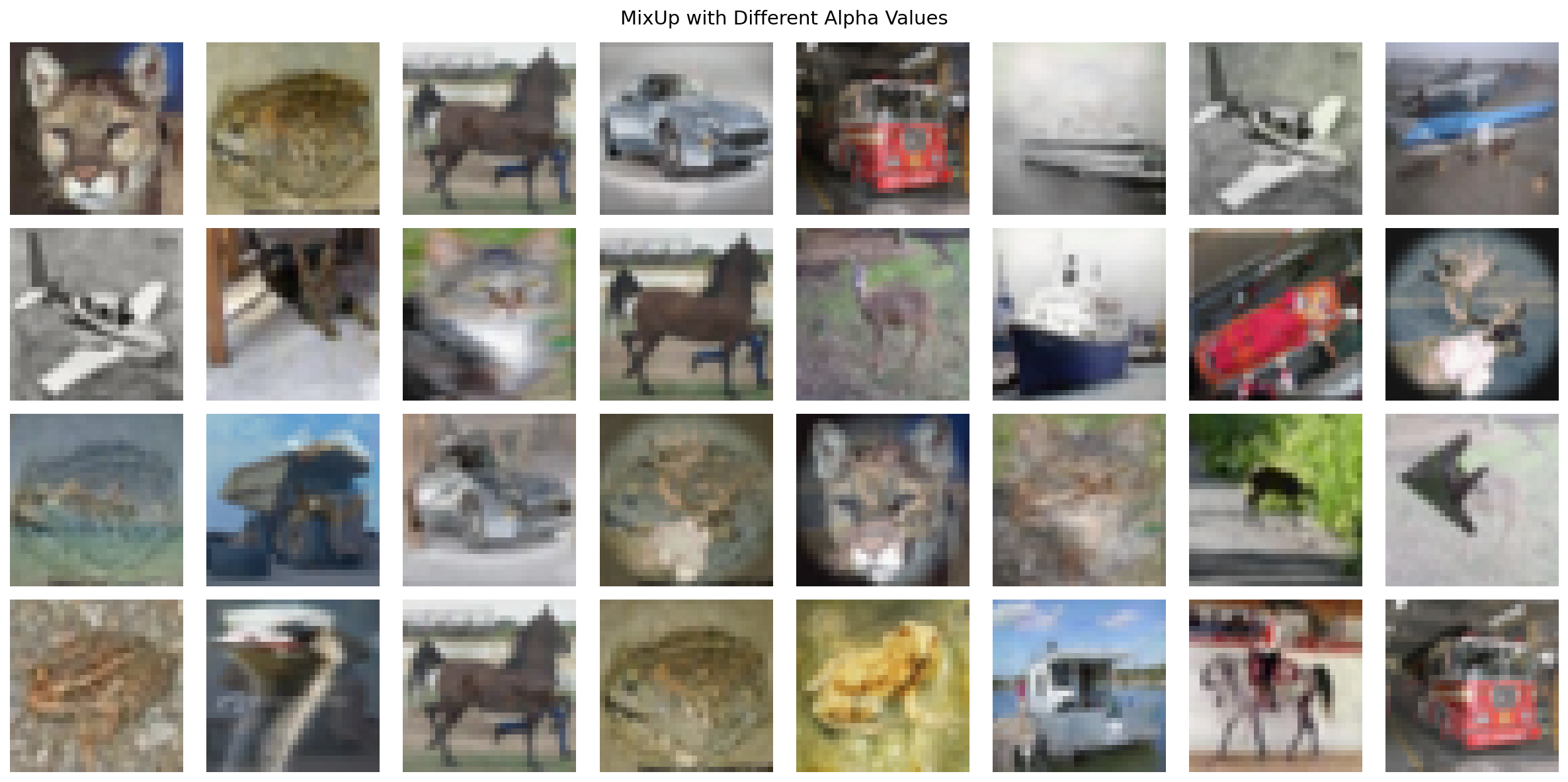
The alpha parameter controls the Beta distribution for mixing ratio λ.
Understanding Alpha¤
- α < 1: Strong bias toward original samples (λ near 0 or 1)
- α = 1: Uniform distribution (any λ equally likely)
- α > 1: Bias toward 50/50 mixing (λ near 0.5)
# Visualize effect of different alpha values
alphas = [0.2, 0.5, 1.0, 2.0]

fig, axes = plt.subplots(len(alphas), 8, figsize=(16, 8))
fig.suptitle("MixUp with Different Alpha Values", fontsize=14)

for row, alpha in enumerate(alphas):
    pipeline = create_mixup_pipeline(alpha=alpha, seed=row * 100)
    batch = next(iter(pipeline))

    for col in range(8):
        img = denormalize_cifar10(batch["image"][col])
        axes[row, col].imshow(img)
        axes[row, col].axis("off")

        if col == 0:
            axes[row, col].set_ylabel(
                f"α={alpha}", fontsize=10, rotation=0, ha="right", va="center"
            )

plt.tight_layout()
plt.savefig(output_dir / "cv-cifar-mix-alpha.png", dpi=150, bbox_inches="tight", facecolor="white")
plt.close()
Terminal Output:
Part 5: Label Distribution Visualization¤
Soft labels are crucial - the model learns that mixed samples have uncertain class membership.
# Collect label distributions from multiple batches
mixup_labels = []
cutmix_labels = []

for i in range(5):
    mixup_pipe = create_mixup_pipeline(alpha=0.4, seed=i)
    cutmix_pipe = create_cutmix_pipeline(alpha=1.0, seed=i + 100)

    mixup_batch = next(iter(mixup_pipe))
    cutmix_batch = next(iter(cutmix_pipe))

    mixup_labels.append(np.array(mixup_batch["label"]))
    cutmix_labels.append(np.array(cutmix_batch["label"]))

mixup_labels = np.concatenate(mixup_labels, axis=0)
cutmix_labels = np.concatenate(cutmix_labels, axis=0)

# Compute max probability per sample (measure of label "hardness")
mixup_max_probs = mixup_labels.max(axis=1)
cutmix_max_probs = cutmix_labels.max(axis=1)

# Plot label distribution comparison
fig, axes = plt.subplots(1, 2, figsize=(12, 5))

# Histogram of max probabilities
axes[0].hist(mixup_max_probs, bins=30, alpha=0.7, label="MixUp (α=0.4)", color="blue")
axes[0].hist(cutmix_max_probs, bins=30, alpha=0.7, label="CutMix (α=1.0)", color="orange")
axes[0].set_xlabel("Max Class Probability")
axes[0].set_ylabel("Count")
axes[0].set_title("Label Hardness Distribution")
axes[0].legend()
axes[0].axvline(x=1.0, color="red", linestyle="--", label="Hard label")

# Example soft label vectors
sample_mixup = mixup_labels[0]
sample_cutmix = cutmix_labels[0]

x = np.arange(NUM_CLASSES)
width = 0.35

axes[1].bar(x - width / 2, sample_mixup, width, label="MixUp", color="blue", alpha=0.7)
axes[1].bar(x + width / 2, sample_cutmix, width, label="CutMix", color="orange", alpha=0.7)
axes[1].set_xlabel("Class")
axes[1].set_ylabel("Probability")
axes[1].set_title("Example Soft Label Vectors")
axes[1].set_xticks(x)
axes[1].set_xticklabels([c[:3] for c in CIFAR10_CLASSES], rotation=45)
axes[1].legend()

plt.tight_layout()
plt.savefig(output_dir / "cv-cifar-mix-labels.png", dpi=150, bbox_inches="tight", facecolor="white")
plt.close()
Terminal Output:

Architecture Diagram¤
flowchart TB
    subgraph Source["Data Source"]
        TFDS[TFDSEagerSource<br/>CIFAR-10]
    end

    subgraph Preprocess["Preprocessing"]
        Norm[Normalize<br/>μ, σ per channel]
        OneHot[One-Hot Encode<br/>10 classes]
    end

    subgraph BatchMix["Batch Mixing"]
        Mode{Mode?}
        MixUp[MixUp<br/>Linear blend<br/>λ ~ Beta(α, α)]
        CutMix[CutMix<br/>Rectangular patch<br/>area ~ Beta(α, α)]
        SoftLabel[Soft Label Mixing<br/>y = λ·y₁ + (1-λ)·y₂]
    end

    subgraph Output["Output"]
        Mixed[Mixed Images<br/>+ Soft Labels]
    end

    TFDS --> Norm --> OneHot
    OneHot --> Mode
    Mode -->|mixup| MixUp --> SoftLabel
    Mode -->|cutmix| CutMix --> SoftLabel
    SoftLabel --> Mixed

    style Source fill:#e1f5ff
    style Preprocess fill:#fff4e1
    style BatchMix fill:#ffe1e1
    style Output fill:#e1ffe1
MixUp vs CutMix Comparison¤
| Aspect | MixUp | CutMix |
|---|---|---|
| Operation | Linear blend: λ·x₁ + (1-λ)·x₂ |
Patch paste: M⊙x₁ + (1-M)⊙x₂ |
| Visual effect | Ghostly overlap of images | Sharp boundary between regions |
| Information | Global features from both | Local features preserved |
| Label mixing | Smooth blending | Proportional to area |
| Best for | General regularization | Object detection, localization |
| Typical α | 0.2 - 0.4 | 1.0 |
| Computation | Element-wise multiply + add | Mask generation + multiply + add |
Results Summary¤
Recommended Settings¤
| Use Case | Mode | Alpha | Rationale |
|---|---|---|---|
| Image classification | MixUp | 0.2-0.4 | Smooth regularization |
| Strong regularization | MixUp | 1.0 | Maximum diversity |
| Object detection | CutMix | 1.0 | Preserves local features |
| Combined (timm-style) | Both | 0.2 MixUp + 1.0 CutMix | Best of both worlds |
Alpha Parameter Guide¤
| Alpha (α) | Distribution Shape | Mixing Behavior | When to Use |
|---|---|---|---|
| 0.1 - 0.3 | U-shaped (extremes) | Mostly original images | Conservative augmentation |
| 0.4 - 0.6 | Moderate | Balanced mixing | Standard training |
| 1.0 | Uniform | All ratios equally likely | Aggressive augmentation |
| 2.0+ | Bell-shaped (center) | Mostly 50/50 mixes | Experimental |
Key Takeaways¤
- Soft labels required: Both techniques produce mixed labels for cross-entropy loss
- Alpha matters: Lower α = more "pure" samples, higher α = more mixing
- Batch-level operation: Uses
apply_batch()instead of per-elementapply() - Pipeline order: Apply after preprocessing, before model forward pass
- Training only: Never use during evaluation/inference
- One-hot encoding: Labels must be one-hot encoded before batch mixing
Integration into Training Loop¤
# Typical usage in training pipeline
def create_training_pipeline():
    source = TFDSEagerSource(train_config, rngs=nnx.Rngs(42))

    # Element-level preprocessing
    preprocessor = ElementOperator(
        ElementOperatorConfig(stochastic=False),
        fn=preprocess_with_onehot,  # Must one-hot encode!
        rngs=nnx.Rngs(0),
    )

    # Batch-level mixing
    mixup = BatchMixOperator(
        BatchMixOperatorConfig(
            mode="mixup",
            alpha=0.4,
            data_field="image",
            label_field="label",  # Must be one-hot!
            stochastic=True,
            stream_name="mixup",
        ),
        rngs=nnx.Rngs(mixup=100),
    )

    return (
        Pipeline(source=source, stages=[preprocessor, mixup], batch_size=128, rngs=nnx.Rngs(0))  # After preprocessing, before training
    )

# Use soft labels in loss function
@nnx.jit
def train_step(model, batch):
    images = batch["image"]
    soft_labels = batch["label"]  # Soft labels from MixUp/CutMix

    logits = model(images)
    # Soft cross-entropy loss
    loss = optax.softmax_cross_entropy(logits, soft_labels).mean()
    return loss
Next Steps¤
- Multi-source pipelines: Interleaved Datasets for mixing data sources
- Full training pipeline: End-to-end CIFAR-10 with complete workflow
- Performance optimization: Optimization Guide for throughput improvements
- Custom batch operators: API Reference for building your own batch-level augmentations